Build a Logos C++ UI module
Get started building a ui_qml module with a C++ backend that runs in a separate process.
This document is accurate for Testnet v0.2.1.
This guide covers building a module that pairs a QML user interface with a C++ backend plugin. The backend runs in a separate ui-host process while the QML view loads inside the host app (logos-basecamp or logos-standalone-app), so a backend crash cannot bring down the host. This guide is intended for developers who have completed Part 1 and want typed, process-isolated inter-module calls from their UI layer.
What to expect
- You can scaffold, configure, and build a
calc_ui_cppmodule with a process-isolated C++ backend. - You can call
calc_modulemethods from QML using a typed replica andlogos.watch(). - You will be able to build, run, and live-reload the module using
nix run.
Step 1: Scaffold the project
Create a new directory and initialise it from the C++ backend UI template.
-
Create and enter the project directory:
mkdir logos-calc-ui-cpp && cd logos-calc-ui-cpp -
Initialise from the template:
nix flake init -t github:logos-co/logos-module-builder/0.2.0#ui-qml-backend -
Initialise a Git repository and stage all generated files:
git init && git add -A -
Remove the template's example sources. The scaffolded template includes
ui_examplefiles with mismatched class names and IIDs; leaving them causes build errors or plugin-load failures at runtime:rm -f src/ui_example.rep src/ui_example_interface.h src/ui_example_plugin.h src/ui_example_plugin.cpp
Step 2: Configure the module metadata
Replace the template metadata.json with your plugin's details.
The calc_module.url input attribute name in flake.nix must match the dependency name declared here in "dependencies".
-
Replace
metadata.jsonwith the following:{"name": "calc_ui_cpp","version": "1.0.0","type": "ui_qml","category": "tools","description": "Calculator C++ UI—QML view with process-isolated backend for calc_module","main": "calc_ui_cpp_plugin","view": "qml/Main.qml","icon": "icons/calc.png","dependencies": ["calc_module"],"nix": {"packages": { "build": [], "runtime": [] },"external_libraries": [],"cmake": {"find_packages": [],"extra_sources": [],"extra_include_dirs": [],"extra_link_libraries": []}}}Key fields:
"type": "ui_qml"—tells the builder this is a QML view module."main": "calc_ui_cpp_plugin"—the backend Qt plugin library name (without extension)."view": "qml/Main.qml"—the QML entry point."dependencies": ["calc_module"]—core modules the backend calls.
-
Create the icons directory and add a placeholder icon (displayed in the
logos-basecampsidebar when the module is loaded):mkdir -p icons# Copy any PNG here - or generate a 64x64 placeholder:echo "iVBORw0KGgoAAAANSUhEUgAAAEAAAABACAYAAACqaXHeAAAAmElEQVR4nO3QMREAIBDAsFeEN3ziCWRkoEP2XmedfX82OkBrgA7QGqADtAboAK0BOkBrgA7QGqADtAboAK0BOkBrgA7QGqADtAboAK0BOkBrgA7QGqADtAboAK0BOkBrgA7QGqADtAboAK0BOkBrgA7QGqADtAboAK0BOkBrgA7QGqADtAboAK0BOkBrgA7QGqADtAboAO0BN/SiO/PatoIAAAAASUVORK5CYII=" | base64 -d > icons/calc.png
Step 3: Define the remote interface
The .rep file is the single source of truth for the interface between the QML view and the C++ backend. repc compiles it at build time into typed source and replica headers.
-
Create
src/calc_ui_cpp.rep:class CalcUiCpp{SLOT(int add(int a, int b))SLOT(int multiply(int a, int b))SLOT(int factorial(int n))SLOT(int fibonacci(int n))SLOT(QString libVersion())}repcgenerates two headers from this file:rep_calc_ui_cpp_source.h:CalcUiCppSimpleSourcewith virtual slots the backend overrides.rep_calc_ui_cpp_replica.h:CalcUiCppReplicawith typed methods the QML view calls.
Step 4: Write the interface header
Create src/calc_ui_cpp_interface.h:
#ifndef CALC_UI_CPP_INTERFACE_H
#define CALC_UI_CPP_INTERFACE_H

#include <QObject>
#include <QString>
#include "interface.h"

class CalcUiCppInterface : public PluginInterface
{
public:
    virtual ~CalcUiCppInterface() = default;
};

#define CalcUiCppInterface_iid "org.logos.CalcUiCppInterface"
Q_DECLARE_INTERFACE(CalcUiCppInterface, CalcUiCppInterface_iid)

#endif // CALC_UI_CPP_INTERFACE_H
Step 5: Configure the CMake build
Create CMakeLists.txt:
cmake_minimum_required(VERSION 3.14)
project(CalcUiCppPlugin LANGUAGES CXX)

if(DEFINED ENV{LOGOS_MODULE_BUILDER_ROOT})
    include($ENV{LOGOS_MODULE_BUILDER_ROOT}/cmake/LogosModule.cmake)
else()
    message(FATAL_ERROR "LogosModule.cmake not found. Set LOGOS_MODULE_BUILDER_ROOT.")
endif()

logos_module(
    NAME calc_ui_cpp
    REP_FILE src/calc_ui_cpp.rep
    SOURCES
        src/calc_ui_cpp_interface.h
        src/calc_ui_cpp_plugin.h
        src/calc_ui_cpp_plugin.cpp
)
REP_FILE tells logos_module() to run repc to generate source/replica headers, generate CalcUiCppViewPluginBase, and build a separate calc_ui_cpp_replica_factory shared library.
Step 6: Write the C++ backend plugin
The backend plugin inherits three base classes:
CalcUiCppSimpleSource—generated from.rep, provides the typed source for Qt Remote Objects.CalcUiCppInterface—standard Logos plugin interface (name(),version()).CalcUiCppViewPluginBase—generated, providessetBackend()andenableRemoting().
-
Create
src/calc_ui_cpp_plugin.h:#ifndef CALC_UI_CPP_PLUGIN_H#define CALC_UI_CPP_PLUGIN_H#include <QString>#include <QVariantList>#include "calc_ui_cpp_interface.h"#include "LogosViewPluginBase.h"#include "rep_calc_ui_cpp_source.h"class LogosAPI;class LogosModules;class CalcUiCppPlugin : public CalcUiCppSimpleSource,public CalcUiCppInterface,public CalcUiCppViewPluginBase{Q_OBJECTQ_PLUGIN_METADATA(IID CalcUiCppInterface_iid FILE "metadata.json")Q_INTERFACES(CalcUiCppInterface)public:explicit CalcUiCppPlugin(QObject* parent = nullptr);~CalcUiCppPlugin() override;QString name() const override { return "calc_ui_cpp"; }QString version() const override { return "1.0.0"; }Q_INVOKABLE void initLogos(LogosAPI* api);// Slots from calc_ui_cpp.rep—return values directly. The QML replica// receives QRemoteObjectPendingReply; use logos.watch() in QML to get the value.int add(int a, int b) override;int multiply(int a, int b) override;int factorial(int n) override;int fibonacci(int n) override;QString libVersion() override;signals:void eventResponse(const QString& eventName, const QVariantList& args);private:LogosAPI* m_logosAPI = nullptr;LogosModules* m_logos = nullptr;};#endif // CALC_UI_CPP_PLUGIN_HinfoIf the interface filename or IID symbol here doesn't match the names in
src/calc_ui_cpp_interface.h, you will get build errors or plugin-load failures at runtime. -
Create
src/calc_ui_cpp_plugin.cpp:#include "calc_ui_cpp_plugin.h"#include "logos_api.h"#include "logos_sdk.h"CalcUiCppPlugin::CalcUiCppPlugin(QObject* parent) : CalcUiCppSimpleSource(parent) {}CalcUiCppPlugin::~CalcUiCppPlugin() { delete m_logos; }void CalcUiCppPlugin::initLogos(LogosAPI* api){if (m_logos) return;m_logosAPI = api;m_logos = new LogosModules(api);// Register this object as the Remote Objects source so the QML replica// can see its properties and call its slots.setBackend(this);}int CalcUiCppPlugin::add(int a, int b) { return m_logos->calc_module.add(a, b); }int CalcUiCppPlugin::multiply(int a, int b) { return m_logos->calc_module.multiply(a, b); }int CalcUiCppPlugin::factorial(int n) { return m_logos->calc_module.factorial(n); }int CalcUiCppPlugin::fibonacci(int n) { return m_logos->calc_module.fibonacci(n); }QString CalcUiCppPlugin::libVersion(){return m_logos->calc_module.libVersion();}
Step 7: Write the QML view
-
Create
src/qml/Main.qml:import QtQuickimport QtQuick.Controlsimport QtQuick.LayoutsItem {id: rootproperty string result: ""property string errorText: ""// Typed replica of the backend running in ui-host (generated from calc_ui_cpp.rep).readonly property var backend: logos.module("calc_ui_cpp")// The ui-host backend connects asynchronously, so the replica isn't// immediately usable. Track readiness reactively: isViewModuleReady()// is a Q_INVOKABLE (not a property), so we re-check it on the// onViewModuleReadyChanged signal and once at startup—never via a// plain property binding, which would not re-evaluate.property bool ready: falseConnections {target: logosfunction onViewModuleReadyChanged(moduleName, isReady) {if (moduleName === "calc_ui_cpp")root.ready = isReady && root.backend !== null}}Component.onCompleted: {root.ready = root.backend !== null && logos.isViewModuleReady("calc_ui_cpp")}// logos.watch() delivers the result of a replica slot call via callbacks.function callCalc(method, args) {if (!root.ready) {root.errorText = "Backend not ready"return}root.errorText = ""root.result = "..."logos.watch(backend[method].apply(backend, args),function(value) { root.result = String(value) },function(error) { root.errorText = String(error) })}ColumnLayout {anchors.fill: parentanchors.margins: 24spacing: 16Text {text: "Logos Calculator (C++ backend)"font.pixelSize: 20color: "#ffffff"Layout.alignment: Qt.AlignHCenter}// Reactive backend-connection indicator.Text {text: root.ready ? "Connected" : "Connecting to backend..."color: root.ready ? "#56d364" : "#f0883e"font.pixelSize: 12Layout.alignment: Qt.AlignHCenter}RowLayout {spacing: 12Layout.fillWidth: trueTextField { id: inputA; placeholderText: "a"; Layout.preferredWidth: 80; validator: IntValidator {} }TextField { id: inputB; placeholderText: "b"; Layout.preferredWidth: 80; validator: IntValidator {} }Button {text: "Add"; enabled: root.readyonClicked: root.callCalc("add", [parseInt(inputA.text) || 0, parseInt(inputB.text) || 0])}Button {text: "Multiply"; enabled: root.readyonClicked: root.callCalc("multiply", [parseInt(inputA.text) || 0, parseInt(inputB.text) || 0])}}RowLayout {spacing: 12Layout.fillWidth: trueTextField { id: inputN; placeholderText: "n"; Layout.preferredWidth: 80; validator: IntValidator { bottom: 0 } }Button { text: "Factorial"; enabled: root.ready; onClicked: root.callCalc("factorial", [parseInt(inputN.text) || 0]) }Button { text: "Fibonacci"; enabled: root.ready; onClicked: root.callCalc("fibonacci", [parseInt(inputN.text) || 0]) }Button { text: "libcalc version"; enabled: root.ready; onClicked: root.callCalc("libVersion", []) }}Rectangle {Layout.fillWidth: trueheight: 56color: root.errorText.length > 0 ? "#3d1a1a" : "#1a2d1a"radius: 8Text {anchors.centerIn: parenttext: root.errorText.length > 0 ? root.errorText: (root.result.length > 0 ? root.result : "Enter values and press a button")color: root.errorText.length > 0 ? "#f85149" : "#56d364"font.pixelSize: 15}}Item { Layout.fillHeight: true }}}Key patterns:
logos.module("calc_ui_cpp")—gets the typed replica, with auto-synced properties.logos.watch(backend.add(1, 2), ...)—delivers aSLOTreturn value as a JS Promise.- The
logosobject is injected by the host at runtime—noQtRemoteObjectsimport is needed.
Step 7.5: Use the Logos Design System in your QML (Optional)
The QML view runs inside the logos-standalone-app host app, which already has logos-design-system on its import path. Use its themed components directly to automatically give your module a polished, consistent look.
-
In
src/qml/Main.qml, add the necessary imports and replace rawButtonandTextFieldelements with design system equivalents:import Logos.Themeimport Logos.Controlsimport Logos.Icons // optional shared icon assets...// Instead of Button:LogosButton {text: qsTr("Add")onClicked: root.callCalc("add", [parseInt(inputA.text) || 0,parseInt(inputB.text) || 0])}...// Instead of TextField:LogosTextField {id: inputAplaceholderText: qsTr("a")}...// Use theme colors instead of hardcoded hex values:Rectangle {color: Theme.palette.backgroundSecondaryradius: Theme.spacing.radiusSmallLogosText { text: qsTr("Result"); color: Theme.palette.text }} -
Explore available components by running the design system storybook in the logos-design-system repo:
git clone https://github.com/logos-co/logos-design-system.gitcd logos-design-system && nix runThe sidebar splits components into:
- Controls—designed per Figma, production-ready (
LogosButton,LogosBadge,LogosCheckbox,LogosComboBox,LogosIconButton,LogosPaginator,LogosSearchBar,LogosTabBar,LogosTable,LogosText,LogosTextField,LogosToolTip, …). - Controls (not designed)—placeholders with stable APIs but unstyled visuals (
LogosDialog,LogosDrawer,LogosScrollView,LogosSpinner,LogosTextArea,LogosSwitch, …). You can ship with them; they'll get the polished look applied later without you having to change your QML.
Theme tokens (use these instead of hex literals or manual font sizes):
Theme.palette.-:background,backgroundSecondary,surface,text,textSecondary,border,primary,success,warning,error,info,hover,pressed, …Theme.spacing.*:tiny,small,medium,large,xlarge,xxlarge,radiusSmall,radiusMedium,radiusLargeTheme.typography.*:pageTitleText(36),titleText(30),panelTitleText(24),subtitleText(16),primaryText(14),secondaryText(12);weightRegular/weightMedium/weightBold;publicSansLogos.Icons.LogosIcons.*:arrowLeft,arrowRight,refresh,install,trash,more,search, …
- Controls—designed per Figma, production-ready (
Step 8: Configure the Nix flake
The template already wires everything up. Update the description and point calc_module at your dependency.
-
Replace
flake.nixwith the following:{description = "Calculator C++ UI plugin for Logos - QML view with process-isolated backend for calc_module";inputs = {logos-module-builder.url = "github:logos-co/logos-module-builder/0.2.0";# Keep this placeholder as is - it gets locked to your real path in the next step.calc_module.url = "path:/path/to/your/calc_module";};outputs = inputs@{ logos-module-builder, calc_module, ... }:logos-module-builder.lib.mkLogosQmlModule {src = ./.;configFile = ./metadata.json;flakeInputs = inputs;};}To point at a published repo instead of a local path, change the
calc_module.urlinput to agithub:URL, for examplecalc_module.url = "github:<your-org>/<your-calc-module>";.
Step 9: Build and run the module
Before building, confirm the calc_module shared library is present from Part 1.
-
Confirm the shared library exists:
# Linuxls ../logos-calc-module/lib/libcalc.so# macOSls ../logos-calc-module/lib/libcalc.dylibIf the file is missing, build it first:
cd ../logos-calc-module/libgcc -shared -fPIC -o libcalc.so libcalc.c # Linux# gcc -shared -fPIC -o libcalc.dylib libcalc.c # macOScd ../../logos-calc-ui-cpp -
Stage all files, then lock
calc_moduleto your local Part 1 checkout. The--override-inputflag resolves../logos-calc-moduleto an absolute path and records it inflake.lock:git add -Anix flake update --override-input calc_module path:../logos-calc-modulegit add flake.lock -
Build and run the app. After the lock is in place, no override flag is needed on subsequent commands:
nix run -
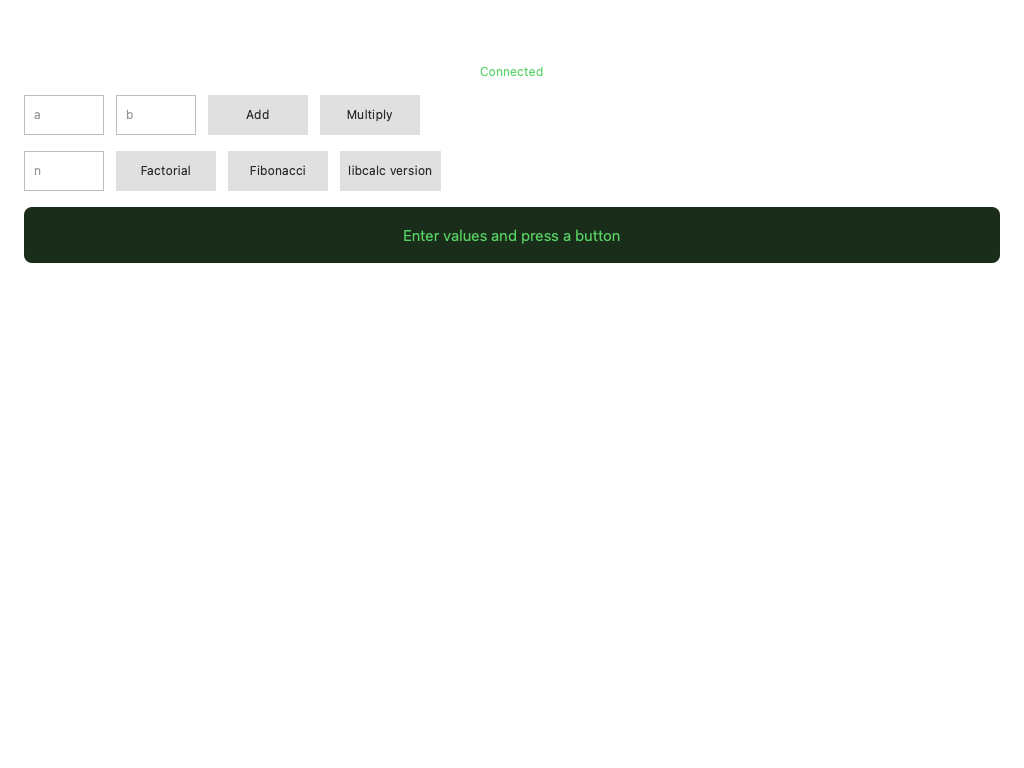
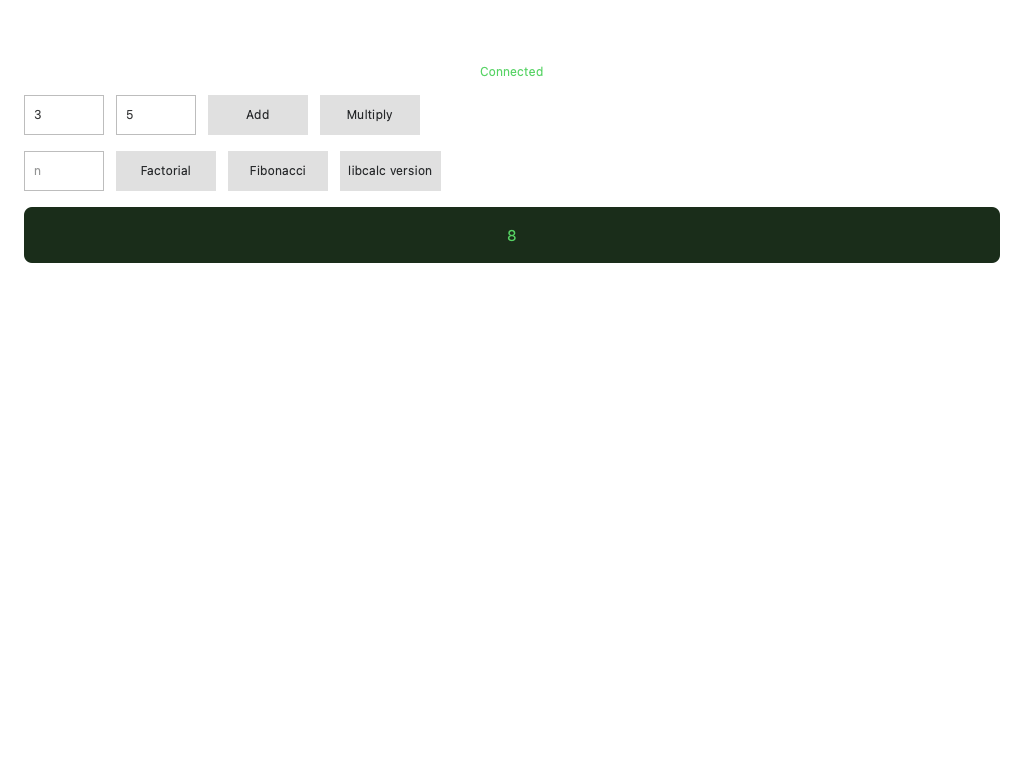
Confirm the view loads with all controls visible, then click Add with values in the input fields to test it out:
Step 10: Update view with live reloading (Optional)
To enable live updates to the UI, set DEV_QML_PATH to the directory that contains your view entry's basename. This tutorial sets "view": "qml/Main.qml" in metadata.json, so the directory must contain Main.qml (here: src/qml/).
-
Run with
DEV_QML_PATHset so that QML is loaded from your source tree at runtime:DEV_QML_PATH=$PWD/src/qml nix run .
Step 11: Add UI integration tests (Optional)
Add automated UI tests using the logos-qt-mcp test framework.
-
Create
tests/ui-tests.mjs:import { resolve } from "node:path";// CI sets LOGOS_QT_MCP automatically; for interactive use: nix build .#test-framework -o result-mcpconst root =process.env.LOGOS_QT_MCP ||new URL("../result-mcp", import.meta.url).pathname;const { test, run } = await import(resolve(root, "test-framework/framework.mjs"));test("calc_ui_cpp: loads and shows title", async (app) => {await app.waitFor(async () => {await app.expectTexts(["Logos Calculator (C++ backend)"]);},{ timeout: 15000, interval: 500, description: "UI to load" },);});test("calc_ui_cpp: operation buttons visible", async (app) => {await app.expectTexts(["Add", "Multiply", "Factorial", "Fibonacci"]);});run(); -
Stage the test file and run the hermetic CI test:
git add tests/nix build .#integration-test -LThe
integration-testoutput launcheslogos-standalone-appwithQT_QPA_PLATFORM=offscreen(no display needed), connects to the QML inspector, and runs all.mjsfiles intests/. -
To run tests interactively against an already-running app, build the test framework and run the app and tests in separate terminals:
nix build .#test-framework -o result-mcpnix run . # terminal 1—app with inspector on :3768node tests/ui-tests.mjs # terminal 2
Troubleshooting the C++ UI module build
The plugin fails to load at runtime with no clear error
Confirm the Q_PLUGIN_METADATA IID and Q_DECLARE_INTERFACE macro in calc_ui_cpp_interface.h both use CalcUiCppInterface_iid. A mismatch causes silent load failures.
Linker errors during nix build
Confirm ../logos-calc-module/lib/libcalc.so for Linux (or .dylib on macOS) exists and that flake.lock was updated with --override-input calc_module path:../logos-calc-module. A stale or placeholder lock file is the most common cause.
DEV_QML_PATH does not seem to take effect
Confirm the path points at the directory containing Main.qml directly—not a parent directory. The host looks for the basename from "view" in metadata.json inside the directory you provide.