Claim leader rewards in the Logos Blockchain UI app
Learn how to get rewarded for having your Logos Blockchain node propose blocks.
This document is accurate for Testnet v0.3.0.
This procedure covers how to claim rewards for participating in the consensus protocol of the Logos Blockchain. Every block your node leads through Proof of Leadership mints a reward voucher, and claiming a voucher redeems it into spendable balance. It is intended for node operators running their node via the Blockchain UI app. The procedure also covers claiming the proof-of-work tickets that mining produces.
- The Blockchain UI app running, with the node Online.
- A funded node that has proposed at least one block. The lifecycle lane on the Node tab reaches Earning once a reward voucher is ready to claim.
What to expect
- You can see how many leader reward vouchers are ready to claim in the Rewards tab and claim one with a single button press.
- You can follow each claim in the History list until it reaches finality, and open its transaction in the Explorer tab.
- You can claim mined proof-of-work tickets from the Mining tab, by hand or automatically.
Claim a reward voucher
Check what is ready to claim, submit a claim, then follow it until it settles.
-
Click the Rewards tab.
- The Ready to claim card shows how many vouchers your wallet can claim now, with their approximate value before fees beneath.
- Click the Ready to claim card to list the vouchers, with the
cmandnfvalues of each and the chain tip they were read at.
infoIf Ready to claim shows
0, your node has not led a block yet, or every voucher has already been claimed. If it shows—, the node has not reported yet. Wait for more blocks; the card updates by itself.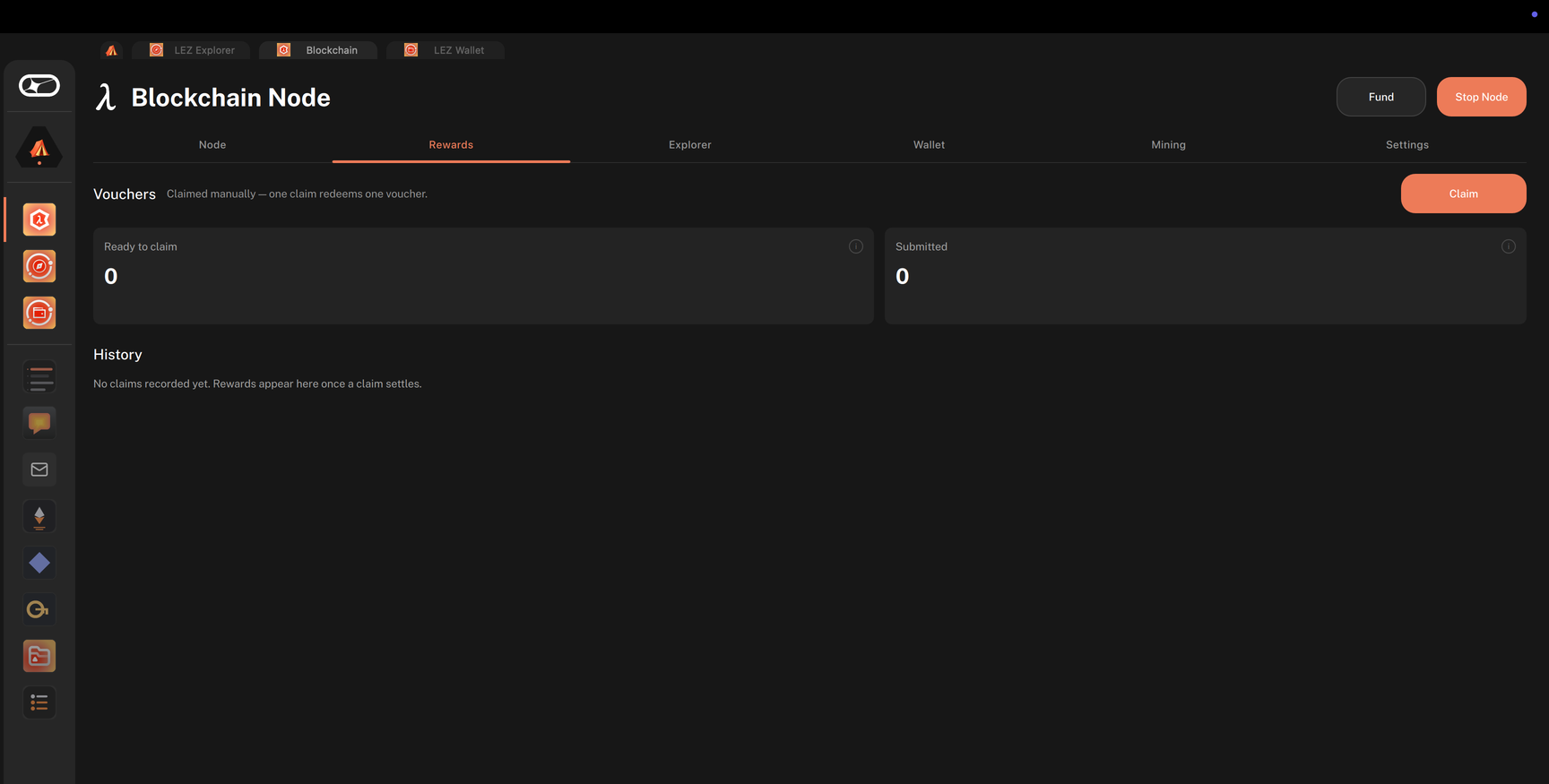
-
Click Claim next to Vouchers, or in the voucher list.
- One claim redeems one voucher, and the protocol picks which one.
- A Claim submitted notice shows the transaction hash. Click the copy button to copy it.
- The Submitted card counts the claim as waiting to land until its transaction is seen in a block.
-
Under History, find the new claim.
- Each entry shows the amount, the Slot, the account it was Paid to, and links to its Tx and Block.
- A
Finalizes in …badge shows how long until the claim is final. The badge disappears once it is. - Select Show only pending to list only the claims that have not reached finality yet.
-
Click the Tx link of the claim to open its transaction in the Explorer tab. Its operation is labelled Leader Claim.
-
Once the claim is final, open the Node tab and check the Earned tile, which adds up the leader rewards this wallet has claimed. To see the balance of the account the reward was paid to, open Wallet > Accounts and click Refresh.
Claim mining rewards
Mining (the Fund button in the header) produces proof-of-work tickets instead of vouchers. A ticket pays nothing until it is claimed, and it expires if it is never claimed. Mining rewards are claimed from the Mining tab, not the Rewards tab.
-
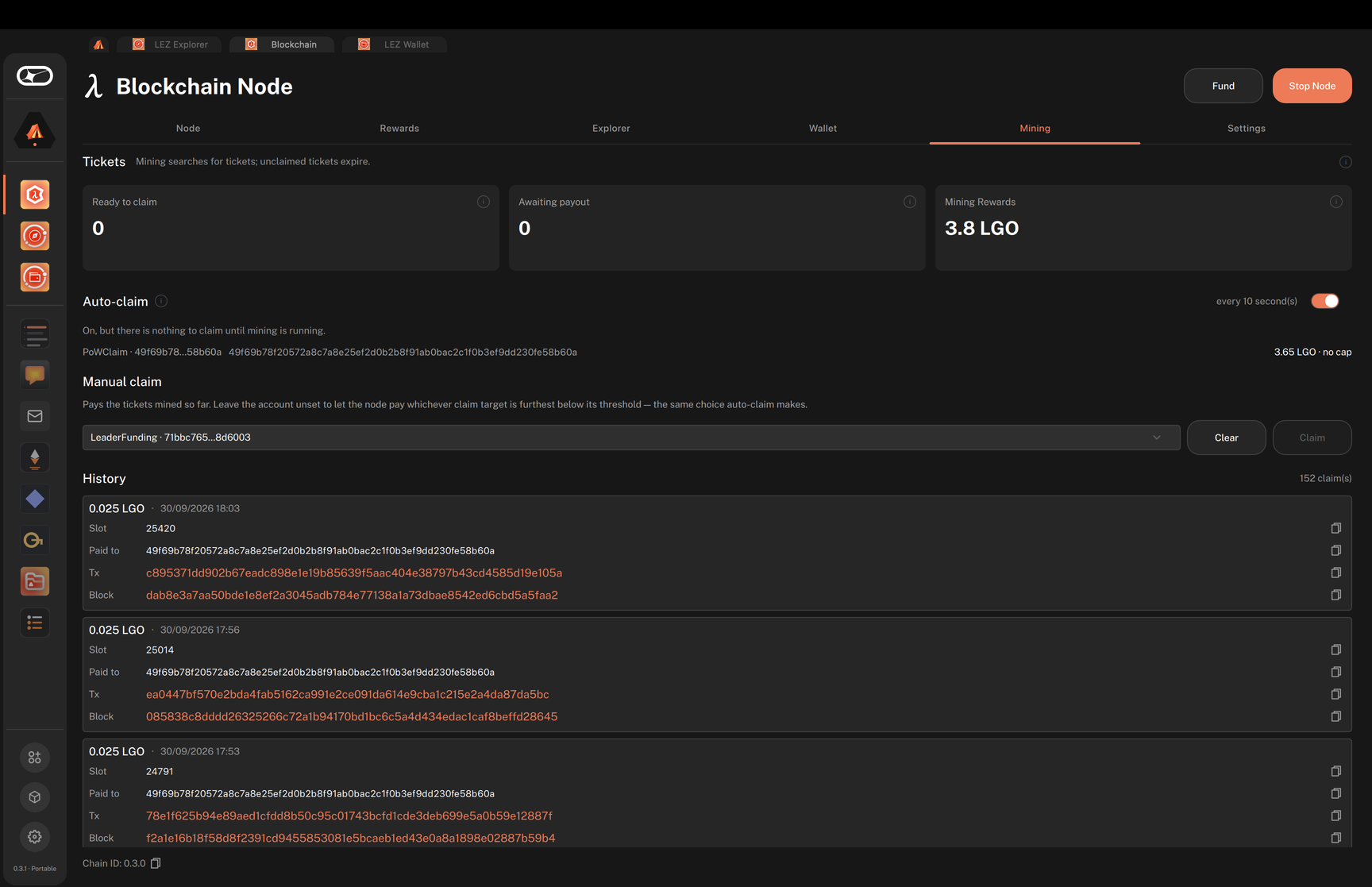
Click the Mining tab.
- Ready to claim shows how many mined tickets the node can still redeem, and how soon the nearest ones expire.
- Awaiting payout shows claims on their way to the chain.
- Mining Rewards shows what mining has paid so far, before fees.
-
Check that Auto-claim is on. The node turns it on at startup whenever the config lists at least one auto-claim target, and a generated config lists your PoWClaim account, so it is on by default.
- Auto-claim pays into the auto-claim targets listed beneath the switch. You set them in the Fund step of the setup wizard, or under
powin the user config. Without a target, the switch stays disabled. - The switch applies to the running node only. When you restart the node, it goes back to what the config says.
- Auto-claim pays into the auto-claim targets listed beneath the switch. You set them in the Fund step of the setup wizard, or under
-
To claim by hand, go to Manual claim. Leave the account set to Let the node choose (click Clear to get back to it), or pick one of your accounts, then click Claim.
- The result appears below the button as
Claim submitted: <hash>, orClaim failed: …. - Each claim then appears under History, as on the Rewards tab.
- The result appears below the button as
Troubleshooting leader rewards
Ready to claim shows 0
The node has not led a block yet, or every voucher has been claimed. A node only leads blocks once its stake has aged in, which can take up to two epochs after funding. Keep the node running; the card updates as new blocks arrive.
The Rewards tab shows Start the node from the Node tab.
The node is not running, so the app cannot read your vouchers. Click Start Node in the header and wait for the Node tab to read Online. While the node is still syncing, the notice reads The node is still catching up.
Clicking Claim shows Claim failed
The node rejected the claim, and the notice shows its error. Confirm that the node is Online and that Ready to claim is above 0 before retrying.
The claim stays in Submitted
Transaction inclusion is not always immediate. Wait for more blocks. A claim that is never seen in a block is dropped from Submitted once the chain has moved well past it; submit a new claim if your voucher is still listed under Ready to claim.
The account balance has not changed after claiming
The balance reflects on-chain state, so it only changes once the claim transaction is in a block. Wait until the claim appears under History, then click Refresh in Wallet > Accounts. Expect slightly less than the voucher's value, because the fee for the claim comes off the reward.
The Mining tab shows Nothing is claiming these tickets
Mining is on but auto-claim is off, so mined tickets expire unclaimed. Switch Auto-claim on, or claim by hand under Manual claim.